Messages Drawer
When notification rules (CRS → Setup → Channels → Multi Channel Settings - Rules Based Notifications) are set up for SynXis Property Hub, the Messages drawer displays on the following SynXis Property Hub pages:
- Dashboard
- Guest Board
- Guest Stay Record
- Guest Folio
- Master Stay Record
- Master Folio
- New Reservation
- Add-ons
- Create Reservation
- Walk-In
- Group Rooming List
Messages are triggered when a user performs an action as configured in the SynXis CRS and display in the Messages drawer in the SynXis Property Hub system.
-
From the New Messages tab, click a message to open it.
-
For bulk actions, click the blue hyperlink to navigate to the Guest Board and view the reservation(s).
-
-
Click Back to mark the message as read. Read messages can be found in the Read Messages tab.
-
Click the X button to minimize the Messages drawer.
Find more information about notification rules within the SynXis CRS Help pages.
Menu and page-level items that are not searchable in the Property Management Help can be found in the SynXis Central Reservation System Help pages.
-
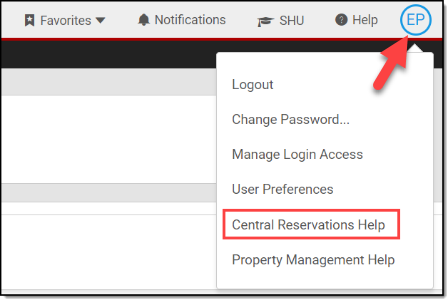
Access the System Menu from the avatar icon containing your initials in the header toolbar.
-
Select Central Reservations Help from the drop-down menu, and use the search bar to find the applicable topic.
